There are many ways through which you can get the Version Number of SAP Kernel.
One of the method is from any window in the top menu go to
system--> status and click on the other kernel info button which is between the navigate and cancel buttons.
Another method is to login as administrator and enter the following disp+work -v. in command field on left top corner. This will show you the kernel version of SAP.
You can also check the log or trace files at os level /usr/sap/work/dev_disp.
You can also get this kernel information from sm51 screen. Go to transaction sm51 then click on database server (single click only. Not double click) and then click on release notes. Then you will see the kernel information and patch level.
If you guys are interested checkout out our new php tutorials website
Php Tutorials
Showing posts with label Security. Show all posts
Showing posts with label Security. Show all posts
Sunday, January 11, 2009

How to restrict Multiple Logins of Users in SAP
This is a critical and security feature. You can know whether some one is logon using your user id from any other computer. Multiple logons of users must be set to 1 in sap production systems. This can be allowed in DEV systems. But in production it must be restricted.
Go to rz10 and change the paramenter
login/multi_login_users. By default the value is 0 which is inactive. If you want to activate mupltiple logons for some users in sap like service users you have to change the parameter
login/disable_multi_gui_login = you have to enter the user names in the values seperated by semi colon ; and dont leave spaces between the userids. Now you have to restart the instance.
Go to rz10 and change the paramenter
login/multi_login_users. By default the value is 0 which is inactive. If you want to activate mupltiple logons for some users in sap like service users you have to change the parameter
login/disable_multi_gui_login = you have to enter the user names in the values seperated by semi colon ; and dont leave spaces between the userids. Now you have to restart the instance.
How to Delete a Scheduled Background Job in SAP
To deleted scheduled jobs in SAP you need to go to Tcode SM37. Now you select the jobs that you want to delete. Click on the check button left side of each job name and now in the menu go to job->delete.
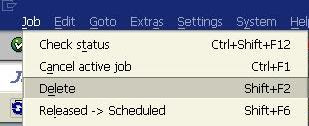
Precaution must be taken when dealing with dependent jobs. If the completion of job1 starts the job2 and if you delete job1 then job2 will not start.
When deleting the jobs the system will inform you of any such dependent jobs and you need to reschedule them to start again

Precaution must be taken when dealing with dependent jobs. If the completion of job1 starts the job2 and if you delete job1 then job2 will not start.
When deleting the jobs the system will inform you of any such dependent jobs and you need to reschedule them to start again
Monday, September 15, 2008
Difference Between SAP_ALL and SAP_NEW
What is the difference between SAP_ALL and SAP_NEW
Definition of SAP_NEW:-
SAP_NEW is a SAP standard Profile which is usually assigned to system users temporarily during an upgrade to ensure that the activities and operations of SAP users is not hindered, during the Upgrade. It contains all the necessary objects and transactions for the users to continue their work during the upgrade. It should be withdrawn once all upgrade activities is completed, and replaced with the now modified Roles as it has extensive authorizations than required.
Definition of SAP_ALL:-
SAP_ALL is a SAP standard profile, which is used on need basis, to resolve particular issues which may arise during the usage of SAP. It is used by Administrators/Developers onlyand is applied on a need to use basis, then withdrawn. It contains all SAP system objects and Transactions. SAP_ALL is very critical and only SAP* contains SAP_ALL attached to it in the production system. No other dialog users have SAP_ALL attached to them.
SAP_NEW is used in the Production environment during a version upgrade whereas SAP_ALL shouldn't be or not allowed be used in Production (for audit purposes obviously), except where necessary, in a controlled manner with all proper approvals from the customer.
Definition of SAP_NEW:-
SAP_NEW is a SAP standard Profile which is usually assigned to system users temporarily during an upgrade to ensure that the activities and operations of SAP users is not hindered, during the Upgrade. It contains all the necessary objects and transactions for the users to continue their work during the upgrade. It should be withdrawn once all upgrade activities is completed, and replaced with the now modified Roles as it has extensive authorizations than required.
Definition of SAP_ALL:-
SAP_ALL is a SAP standard profile, which is used on need basis, to resolve particular issues which may arise during the usage of SAP. It is used by Administrators/Developers only
SAP_NEW is used in the Production environment during a version upgrade whereas SAP_ALL shouldn't be or not allowed be used in Production (for audit purposes obviously), except where necessary, in a controlled manner with all proper approvals from the customer.
Friday, June 27, 2008
The virsa firefighter tool
The virsa firefighter tool is used to perform critical tasks.
For example., If you have to access sa38 (which is highly critical) you need to the virsa firefighter tool.
To access a firefighter one has to have a access to transaction /virsa/zvfat.
also each action or work done by you is logged in the system.
you are questionable for each of your actions done using Firefighter tool.
The firefighter id have access to large no of critical transactions.
Normally the structure of firefighter id is line
Fire fighter admin (who creates and maintains the id)
Fire fighter owner ( who assign the firefighter id to an user)
Fire fighter controller ( who analyses the logs of the activities done by FF id)
Fire fighter's ( the user who uses the id)
Note:- Password login is not possible for FF ID. You will login after running /virsa/zvfat tcode and clicking on logon button..
For example., If you have to access sa38 (which is highly critical) you need to the virsa firefighter tool.
To access a firefighter one has to have a access to transaction /virsa/zvfat.
also each action or work done by you is logged in the system.
you are questionable for each of your actions done using Firefighter tool.
The firefighter id have access to large no of critical transactions.
Normally the structure of firefighter id is line
Fire fighter admin (who creates and maintains the id)
Fire fighter owner ( who assign the firefighter id to an user)
Fire fighter controller ( who analyses the logs of the activities done by FF id)
Fire fighter's ( the user who uses the id)
Note:- Password login is not possible for FF ID. You will login after running /virsa/zvfat tcode and clicking on logon button..
Thursday, June 26, 2008
How to restrict Material Master Views for a USER?
Normally these views appear in tcodes like MM01 , MM02, MM03 & CV01 etcc.
To restrict access to material master views uncheck those views in M_MATE_STA
we have two fields here..
activity & STATM. We restricts material master views using STATM FIELD.
These are the possible values for STATM
Here B , G,K are critical values.. One should not give even display authorizations to them.
To restrict access to material master views uncheck those views in M_MATE_STA
we have two fields here..
activity & STATM. We restricts material master views using STATM FIELD.
These are the possible values for STATM
| User department | Maintenance status |
| Work scheduling | A |
| Accounting | B |
| Classification | C |
| MRP | D |
| Purchasing | E |
| Production resources/tools | F |
| Costing | G |
| Basic data | K |
| Storage | L |
| Forecasting | P |
| Quality management | Q |
| Warehouse management | S |
| Sales | V |
| Plant stocks | X |
| Storage location stocks | Z |
Here B , G,K are critical values.. One should not give even display authorizations to them.
Saturday, June 14, 2008
Possible values for ACTVT field
These are the possible activities you can find for activity field
ACTVT FIELD possible entries
01 Create or generate
02 Change
03 Display
04 Print, edit messages
05 Lock
06 Delete
07 Activate, generate
08 Display change documents
09 Display prices
10 Post
11 Change number range status
12 Maint.and gen.change document
13 Initialize number levels
14 Field select.:Generate screen
15 Field select.:Assign table
16 Execute
17 Maintain number range object
18 Deliveries from coll. proc.
19 Invoices from coll. proc
20 Transport without translation
21 Transport
22 Enter, Include, Assign
23 Maintain
24 Archive
25 Reload
26 Change customer account group
27 Display totals records
28 Display line items
29 Display saved data
30 Determine
31 Confirm
32 Save
33 Read
34 Write
35 Output
36 Extended maintenance
37 Accept
38 Perform
39 Check
40 Create in DB
41 Delete in DB
42 Convert to DB
43 Release
44 Flag
45 Allow
46 Merge
47 Borrow
48 Simulate
49 Request
50 Move
51 Initialize
52 Change application start
53 Display application start
54 Display application archive
55 Change application archive
56 Display archive
57 Save archive
58 Display takeover
59 Distribute
60 Import
61 Export
62 Create automatic Ledger
63 Activate
64 Generate
65 Reorganize
66 Refresh
67 Translate
68 Model
69 Discard
70 Administer
71 Analyze
72 Plan
73 Execute Digital Signature
74 Revoke approval
75 Remove
76 Enter
77 Pre-enter
78 Assign
79 Assign Role to Composite Role
80 Print
81 Schedule
82 Supplement
83 Counterconfirm
84 Settle
85 Reverse
86 Rebook
87 Return
88 Perform
89 Force Posting
90 Copy
91 Reactivate
92 Create from Template
93 Calculate
94 Override
95 Unlock
96 Reject
97 Set
98 Mark for release
99 Generate invoice list
A1 Accrue
A2 Pay
A3 Change status
A4 Resubmit
A5 Display reports
A6 Read with filter
A7 Write with filter
A8 Process mass data
A9 Send
AA Print Again
AB Settle
B1 Display permitted values
B2 Complete Technically
B3 Derive
B9 Post Parked Document
BD Maintain obj. in non-OwnerSys.
BE IMG projection
C1 Maintenance of payment cards
C2 Display of payment cards
C3 Maintenance of manual auth.
C4 Develope Payment Card
C5 Reopen
C8 Confirm change
D1 Copy
DL Download
DP Delete plan
E0 Save extract
E6 Delete own extracts
E7 Delete external extracts
EP Prioritise extract
FP Change customer field selectn
G1 Maintain Budget
G2 Billing
G3 Maintain Overhead Costs
G4 Maintain Reevaluation
G5 Park
G6 Transfer Budget
G7 Reverse
GL General overview
H1 Deactivate
H2 Activate Logging
H3 Deactivate Logging
KA Activate notice
KI Knock In
KO Knock Out
KS Reverse notice
KU Give notice
L0 All functions
L1 Function range level 1
L2 Function range level 2
LM Change LDAP Mapping
LS Change LDAP Sync. Switch
MA Deactivate mod.assistant
P0 Accept CCMS CSM data
P1 Edit CCMS CSM data
P2 Maintain CCMS CSM methods
P3 Register CCMS CSM remote systm
PA Open Period
PB Close Period
PC Open Consolid. Grp Processing
PD Close Consolid. Unit Processng
PU Publish
RS Send to New Recipient
S1 Edit template
S2 Edit specification
SO Edit in Sourcing
SZ Assign Switch Framework Switch
U2 Compare business volumes
U3 Change business volume comp.
U4 Add business volume data
UL Upload
V1 Create version
V2 Change Version
V3 Display Version
V4 Delete Version
V5 Transport Version
V6 Delete Version Header
VE Create an Enhancement ID
VF Expired
These are only some them.. They can be additional ones like
BTCSUBMIT, SUBMIT, VARIANT etc..
ACTVT FIELD possible entries
01 Create or generate
02 Change
03 Display
04 Print, edit messages
05 Lock
06 Delete
07 Activate, generate
08 Display change documents
09 Display prices
10 Post
11 Change number range status
12 Maint.and gen.change document
13 Initialize number levels
14 Field select.:Generate screen
15 Field select.:Assign table
16 Execute
17 Maintain number range object
18 Deliveries from coll. proc.
19 Invoices from coll. proc
20 Transport without translation
21 Transport
22 Enter, Include, Assign
23 Maintain
24 Archive
25 Reload
26 Change customer account group
27 Display totals records
28 Display line items
29 Display saved data
30 Determine
31 Confirm
32 Save
33 Read
34 Write
35 Output
36 Extended maintenance
37 Accept
38 Perform
39 Check
40 Create in DB
41 Delete in DB
42 Convert to DB
43 Release
44 Flag
45 Allow
46 Merge
47 Borrow
48 Simulate
49 Request
50 Move
51 Initialize
52 Change application start
53 Display application start
54 Display application archive
55 Change application archive
56 Display archive
57 Save archive
58 Display takeover
59 Distribute
60 Import
61 Export
62 Create automatic Ledger
63 Activate
64 Generate
65 Reorganize
66 Refresh
67 Translate
68 Model
69 Discard
70 Administer
71 Analyze
72 Plan
73 Execute Digital Signature
74 Revoke approval
75 Remove
76 Enter
77 Pre-enter
78 Assign
79 Assign Role to Composite Role
80 Print
81 Schedule
82 Supplement
83 Counterconfirm
84 Settle
85 Reverse
86 Rebook
87 Return
88 Perform
89 Force Posting
90 Copy
91 Reactivate
92 Create from Template
93 Calculate
94 Override
95 Unlock
96 Reject
97 Set
98 Mark for release
99 Generate invoice list
A1 Accrue
A2 Pay
A3 Change status
A4 Resubmit
A5 Display reports
A6 Read with filter
A7 Write with filter
A8 Process mass data
A9 Send
AA Print Again
AB Settle
B1 Display permitted values
B2 Complete Technically
B3 Derive
B9 Post Parked Document
BD Maintain obj. in non-OwnerSys.
BE IMG projection
C1 Maintenance of payment cards
C2 Display of payment cards
C3 Maintenance of manual auth.
C4 Develope Payment Card
C5 Reopen
C8 Confirm change
D1 Copy
DL Download
DP Delete plan
E0 Save extract
E6 Delete own extracts
E7 Delete external extracts
EP Prioritise extract
FP Change customer field selectn
G1 Maintain Budget
G2 Billing
G3 Maintain Overhead Costs
G4 Maintain Reevaluation
G5 Park
G6 Transfer Budget
G7 Reverse
GL General overview
H1 Deactivate
H2 Activate Logging
H3 Deactivate Logging
KA Activate notice
KI Knock In
KO Knock Out
KS Reverse notice
KU Give notice
L0 All functions
L1 Function range level 1
L2 Function range level 2
LM Change LDAP Mapping
LS Change LDAP Sync. Switch
MA Deactivate mod.assistant
P0 Accept CCMS CSM data
P1 Edit CCMS CSM data
P2 Maintain CCMS CSM methods
P3 Register CCMS CSM remote systm
PA Open Period
PB Close Period
PC Open Consolid. Grp Processing
PD Close Consolid. Unit Processng
PU Publish
RS Send to New Recipient
S1 Edit template
S2 Edit specification
SO Edit in Sourcing
SZ Assign Switch Framework Switch
U2 Compare business volumes
U3 Change business volume comp.
U4 Add business volume data
UL Upload
V1 Create version
V2 Change Version
V3 Display Version
V4 Delete Version
V5 Transport Version
V6 Delete Version Header
VE Create an Enhancement ID
VF Expired
These are only some them.. They can be additional ones like
BTCSUBMIT, SUBMIT, VARIANT etc..
Saturday, May 17, 2008
How to list all transactions executable for a role.
Goto SUIM----> transactions----> executable for role.

and enter the role name and press F8 to get the results.
but this gives only tcode in the menu of the role.
It will not show the tcodes that are added manually to the role in S_TCODE object.
To find all tcode executable for role along with the tcode that are present in the tcd field..
goto se16 enter agr_1251 and click on data browser button
enter the role name in agr_name field and enter tcd in FIELD field ash shown in figure.

Then click on execute button or press F8 to execute and you will see the list of tcodes executable for that role as below

and enter the role name and press F8 to get the results.
but this gives only tcode in the menu of the role.
It will not show the tcodes that are added manually to the role in S_TCODE object.
To find all tcode executable for role along with the tcode that are present in the tcd field..
goto se16 enter agr_1251 and click on data browser button
enter the role name in agr_name field and enter tcd in FIELD field ash shown in figure.
Then click on execute button
or press F8 to execute and you will see the list of tcodes executable for that role as below
Friday, May 16, 2008
How to deactivate the password of a user
How to deactivate or disable the password of a user?.
Got to suo1. enter the user name and click on display icon. Next goto logon data tab and press the deactivate button .The password will be deactivated
to reactive the password just type the password in the password field and it will be reactivated
Got to suo1. enter the user name and click on display icon. Next goto logon data tab and press the deactivate button
.The password will be deactivatedto reactive the password just type the password in the password field and it will be reactivated
How to lock a user in SAP
Goto SU01
enter the userID to be locked in the user field

and click on lock button Then you will see the the following screen if the user is already locked.

click on the unlock button at the bottom left of the window and the user will be unlocked.
to lock a user again enter the user id in the user field and click on lock button
and you will see the following screen

now press on the lock button to lock the user...
you can also lock the user at database level. login to the system database..then run a query to update the USR02 table.
To lock an user.
SQL> UPDATE USR02 SET UFLAG = '64' where BNAME='USERID' AND MANDT='CLIENT'
SQL> COMMIT
To unlock an user use
SQL> UPDATE USR02 SET UFLAG = '0' where BNAME='USERID' AND MANDT='CLIENT'
SQL> COMMIT
Here the different values of uflag have different meaning
UFLAG value
enter the userID to be locked in the user field
and click on lock button
Then you will see the the following screen if the user is already locked.click on the unlock button at the bottom left of the window and the user will be unlocked.
to lock a user again enter the user id in the user field and click on lock button
and you will see the following screen
now press on the lock button to lock the user...
you can also lock the user at database level. login to the system database..then run a query to update the USR02 table.
To lock an user.
SQL> UPDATE USR02 SET UFLAG = '64' where BNAME='USERID' AND MANDT='CLIENT'
SQL> COMMIT
To unlock an user use
SQL> UPDATE USR02 SET UFLAG = '0' where BNAME='USERID' AND MANDT='CLIENT'
SQL> COMMIT
Here the different values of uflag have different meaning
UFLAG value
- 0 ------ Not locked
- 16 ------ Mystery values
- 32 ------ Locked by CUA admin
- 64 ------ Locked by system Administrator
- 128 ------ Locked due to incorrect logon attempts or too many failed attempts
- 192 ------ A combination of both. The user is locked by admin and user tries to logon with incorrect passwords and gets locked ( 192 = 64+128)
Tuesday, May 13, 2008
List of Tcodes executable for a User
How to find the list of tcodes executable for an user or the tcodes which an user is authorized in SAP.
Use SUIM .
goto SUIM tcode then drill down
transactions -----> executable for user.
Then run that program and enter the USERID of the user and press F8. Then you will see the list of tcodes executable for the user
Use SUIM .
goto SUIM tcode then drill down
transactions -----> executable for user.
Then run that program and enter the USERID of the user and press F8. Then you will see the list of tcodes executable for the user
Monday, May 12, 2008
How to get the list of users authorized for a Particular TCODE
Goto SUIM then drill down
user --> complex selection criteria --> by transaction authorizations and enter the tcode click on execute button
then you will see a screen as below
 Enter the tcode and press F8 key to get the list of users who has authorizations to a particular tcode
user --> complex selection criteria --> by transaction authorizations and enter the tcode click on execute button

then you will see a screen as below
 Enter the tcode and press F8 key to get the list of users who has authorizations to a particular tcode
Sunday, May 11, 2008
Sap Basis and Sap Security
Sap Security comes under SAP BASIS. It is a subset of Basis to an extent.
Normally, the functions of a security administrator are
1) To see that no critical tcodes are given to end users
2) Creation and deletion of users.
3) Creation of roles.
4) Locking and unlocking users.
5) Resetting user's passwords.
6) Giving auditors required information etc....
7) Giving authorizations to users or removing them.
In one sentence your job is to make system Risk free...
But there is one thing a security admin must do...
SAVE YOUR ASS FIRST.
don't do any thing without an artifact or supporting documents
SAP BASIS Consultants perform the following functions..
1) Monitoring the system (very very critical task)
2) Releasing jobs.
3) Transport change requests into system
4) Updating the system or applying patches..
5) Opening the client when required(setting client to modifiable in emergency case)
6) Performing System Health checks
7) Setting up printers
8) Managing TMS etc....
Normally, the functions of a security administrator are
1) To see that no critical tcodes are given to end users
2) Creation and deletion of users.
3) Creation of roles.
4) Locking and unlocking users.
5) Resetting user's passwords.
6) Giving auditors required information etc....
7) Giving authorizations to users or removing them.
In one sentence your job is to make system Risk free...
But there is one thing a security admin must do...
SAVE YOUR ASS FIRST.
don't do any thing without an artifact or supporting documents
SAP BASIS Consultants perform the following functions..
1) Monitoring the system (very very critical task)
2) Releasing jobs.
3) Transport change requests into system
4) Updating the system or applying patches..
5) Opening the client when required(setting client to modifiable in emergency case)
6) Performing System Health checks
7) Setting up printers
8) Managing TMS etc....
Saturday, May 3, 2008
The se16 tcode.
This code is used to view table data. This is a high data security risk since the user can access confidential data. It also causes performance hit when large tables are viewed. This tcode must be restricted to few users or firefighter ids.
You can see the initial screen. Here we enter the table name to be viewed and hit the enter button and click on the view data button .
.
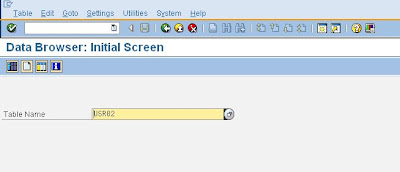
You will see the next selection fields appear as shown below. YOu have to enter your selection criteria so that only selected data can be view. Normally almost all tables are large in size so its better to view only selected data. IF you try to view the whole data of the table it takes long time to display and performance of the server get s hit .
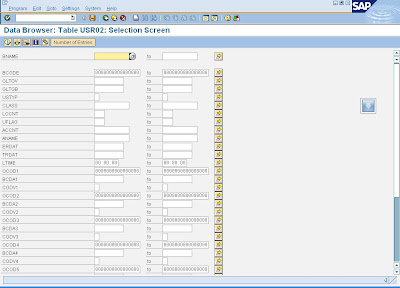
S_TABUS_DIS is checked for authorization of SE16. One can give display activity ( 03) only to and end user for this tcode and authorization group DICERBLS field is also checked. give 03 activity and authorization group which the user belongs to for restricting access. YOU should not give 02 activity. If given the user can do changes to table data which gives rise to data integrity issues...
The user must be in a particular USER group like FI to view FI tables or CO to view CO tables. Without user group assignment one cannot see the respective tables. These user groups are maintained using tcode SUGR. These user groups are different from the logon user groups which has entirely different purpose.
It is recommended that custom reports or Tcode are to be generated with particular variants and given to end user. SE16 should no be given to end user. On can create CUSTOM Queries using SQVI tcode and custom transaction using SE93.
You can see the initial screen. Here we enter the table name to be viewed and hit the enter button and click on the view data button
 .
.
You will see the next selection fields appear as shown below. YOu have to enter your selection criteria so that only selected data can be view. Normally almost all tables are large in size so its better to view only selected data. IF you try to view the whole data of the table it takes long time to display and performance of the server get s hit .

S_TABUS_DIS is checked for authorization of SE16. One can give display activity ( 03) only to and end user for this tcode and authorization group DICERBLS field is also checked. give 03 activity and authorization group which the user belongs to for restricting access. YOU should not give 02 activity. If given the user can do changes to table data which gives rise to data integrity issues...
The user must be in a particular USER group like FI to view FI tables or CO to view CO tables. Without user group assignment one cannot see the respective tables. These user groups are maintained using tcode SUGR. These user groups are different from the logon user groups which has entirely different purpose.
It is recommended that custom reports or Tcode are to be generated with particular variants and given to end user. SE16 should no be given to end user. On can create CUSTOM Queries using SQVI tcode and custom transaction using SE93.
Friday, May 2, 2008
Some important HR tocdes
HR Transactions
PA03 Change Payroll control record
PA20 Display PA Infotypes
PA30 Create/Change PA Infotypes
PP02 Quick Entry for PD object creation
PU00 Delete PA infotypes for an employee.
Ok what is the need of these tcodes for an security consultant?
Normally when you create an user id in the system first you check whether the user is an employee of the organization or not. For this we use PA20. Which is very helpful. we enter the unique ticket no of the employee and see whether the name and organizational details are matching or not. These are HR transactions also available in R/3. Here Infotype and personal Area are critical authorization fields which are present in authorization object P_ORGINCON.
PA03 Change Payroll control record
PA20 Display PA Infotypes
PA30 Create/Change PA Infotypes
PP02 Quick Entry for PD object creation
PU00 Delete PA infotypes for an employee.
Ok what is the need of these tcodes for an security consultant?
Normally when you create an user id in the system first you check whether the user is an employee of the organization or not. For this we use PA20. Which is very helpful. we enter the unique ticket no of the employee and see whether the name and organizational details are matching or not. These are HR transactions also available in R/3. Here Infotype and personal Area are critical authorization fields which are present in authorization object P_ORGINCON.
Thursday, May 1, 2008
How to lock or unlock transactions in SAP
There are some transactions that has to be locked in some sittuations, like se01 when system maintenance is going on like se01 or there are some critical transactions like scc5 that has to be locked... To lock such transactions we use sm01. After execution sm01 and selecting a particular transaction by entering in the search field

just check the field along the tcode and the transaction code will be locked. TO unlock the tcode just uncheck the check button

just check the field along the tcode and the transaction code will be locked. TO unlock the tcode just uncheck the check button
What is and authorization object
An authorization object is a collection of fields. Each field can have many values.
For example S_TABU_DIS has two fields.
This authorization object is checked when tcode se16 (table display) is executed.
ACTVT is the activity one can do in that tcode. and DICBERCLS is the authorization group for which the ACTVT is valid.
if you have values ACTVT as 3 (display ) and DICBERCLS is "par" you can see all the tables which are included in authorization group par. and if you have ACTVT as 2 (change) then you can edit the tables in authorization group par.
For example S_TABU_DIS has two fields.
Authorization Field | Long Text |
DICBERCLS | Authorization group |
ACTVT | Activity |
This authorization object is checked when tcode se16 (table display) is executed.
ACTVT is the activity one can do in that tcode. and DICBERCLS is the authorization group for which the ACTVT is valid.
if you have values ACTVT as 3 (display ) and DICBERCLS is "par" you can see all the tables which are included in authorization group par. and if you have ACTVT as 2 (change) then you can edit the tables in authorization group par.
difference between SA38 and SE38
SA38 and SE38 both transaction codes are highly critical. SA38 is used to run programs and reports in the system. With SE38 you even view the source code and develop the programs and you can even debug in the sap system causing high loads on the system which leads to performance hit. Due to their high critical nature these tcodes are restricted or locked in the production environment. They are locked by the system administrator in the production system. The only people that have access to se38 are Developers in Development system.
Wednesday, April 30, 2008
The tcode SU24
SU24 gives you the list of authorization objects that are checked when an tocde is executed. For example when you enter tcode mbo2 there are many authorization objects checked for the transaction to be executed successfully. This tcode gives all of the authorization objexts that are checked or included for checking during the execution of this tcode. A security consultant will have acces to su24 transaction. This is helpful when dealing with su53 dumps.
Goto transaction Su24 you will end up with a screen as shown below

Then enter transaction like ME28 ( int the figure different Tcode is used)
and press F8 key. Then you will see the following screen. Here you can see list of objects that has will be checked during execution of the tcode. The objects with proposal values (last column) set to YS will be checked and are added to the profile when the tcode is entered in role menu.
Click on the image to see full view.
And the color indicator (first column) green === globally active
light gray OR DIAMOND shape == globally inactive objects which are not checked in any case.
The objects with proposal YS are checked definitely. The objects with proposal NO will not be checked normally. They will be checked based on the input entered in the tcode.
as you can see the last but one column is global check indicator which indicates whether the object is disabled globally or not.
Goto transaction Su24 you will end up with a screen as shown below
Then enter transaction like ME28 ( int the figure different Tcode is used)
and press F8 key. Then you will see the following screen.
 Here you can see list of objects that has will be checked during execution of the tcode. The objects with proposal values (last column) set to YS will be checked and are added to the profile when the tcode is entered in role menu.
Click on the image to see full view.
And the color indicator (first column) green === globally active
light gray OR DIAMOND shape == globally inactive objects which are not checked in any case.
The objects with proposal YS are checked definitely. The objects with proposal NO will not be checked normally. They will be checked based on the input entered in the tcode.
as you can see the last but one column is global check indicator which indicates whether the object is disabled globally or not.
Thursday, April 24, 2008
The sa38 tcode
Tcode SA38 is used to run programs or reports in SAP. This Tcode is highly critical. This tcode is generally not given to any one int Production and quality environment. Only Virsa firefighter ids and SUPER users has this tcode.
enter SA38 in the command field on top left corner and hit enter key.
Then you will see the screen Then enter the program name and press F8 key or click on execute button
Then you will see the program screen......

After that i hope you know what you are supposed to do.
When you add SA38 to a role menu the following objects gets added
S_PROGRAM
and authorization groups.
the S_PROGRAM object contains the following values
SUBMIT
BTCSUBMIT
VARIANT

SUBMIT allows one to run a program.
BTCSUBMIT allows the user to Schedule a background job for the execution of a program.
VARIANT allows user to maintain variants for the program.
These three can be given depending upon the policy of the customer.
There is another tcode SE38 which has same functionality as SA38 but can do a lot more than sa38
for more info go diffrence between SA38 and SE38
To find out how to lock these critical tcode refer this page
enter SA38 in the command field on top left corner and hit enter key.
Then you will see the screen
 Then enter the program name and press F8 key or click on execute button
 Then you will see the program screen......
After that i hope you know what you are supposed to do.
When you add SA38 to a role menu the following objects gets added
S_PROGRAM
and authorization groups.
the S_PROGRAM object contains the following values
SUBMIT
BTCSUBMIT
VARIANT

SUBMIT allows one to run a program.
BTCSUBMIT allows the user to Schedule a background job for the execution of a program.
VARIANT allows user to maintain variants for the program.
These three can be given depending upon the policy of the customer.
There is another tcode SE38 which has same functionality as SA38 but can do a lot more than sa38
for more info go diffrence between SA38 and SE38
To find out how to lock these critical tcode refer this page
Subscribe to:
Posts (Atom)
Showing posts with label Security. Show all posts
Showing posts with label Security. Show all posts
Sunday, January 11, 2009
How to know or get the Kernel Version of SAP system
There are many ways through which you can get the Version Number of SAP Kernel.
One of the method is from any window in the top menu go to
system--> status and click on the other kernel info button which is between the navigate and cancel buttons.
Another method is to login as administrator and enter the following disp+work -v. in command field on left top corner. This will show you the kernel version of SAP.
You can also check the log or trace files at os level /usr/sap/work/dev_disp.
You can also get this kernel information from sm51 screen. Go to transaction sm51 then click on database server (single click only. Not double click) and then click on release notes. Then you will see the kernel information and patch level.
If you guys are interested checkout out our new php tutorials website
Php Tutorials
One of the method is from any window in the top menu go to
system--> status and click on the other kernel info button which is between the navigate and cancel buttons.
Another method is to login as administrator and enter the following disp+work -v. in command field on left top corner. This will show you the kernel version of SAP.
You can also check the log or trace files at os level /usr/sap/work/dev_disp.
You can also get this kernel information from sm51 screen. Go to transaction sm51 then click on database server (single click only. Not double click) and then click on release notes. Then you will see the kernel information and patch level.
If you guys are interested checkout out our new php tutorials website
Php Tutorials
How to restrict Multiple Logins of Users in SAP
This is a critical and security feature. You can know whether some one is logon using your user id from any other computer. Multiple logons of users must be set to 1 in sap production systems. This can be allowed in DEV systems. But in production it must be restricted.
Go to rz10 and change the paramenter
login/multi_login_users. By default the value is 0 which is inactive. If you want to activate mupltiple logons for some users in sap like service users you have to change the parameter
login/disable_multi_gui_login = you have to enter the user names in the values seperated by semi colon ; and dont leave spaces between the userids. Now you have to restart the instance.
Go to rz10 and change the paramenter
login/multi_login_users. By default the value is 0 which is inactive. If you want to activate mupltiple logons for some users in sap like service users you have to change the parameter
login/disable_multi_gui_login = you have to enter the user names in the values seperated by semi colon ; and dont leave spaces between the userids. Now you have to restart the instance.
How to Delete a Scheduled Background Job in SAP
To deleted scheduled jobs in SAP you need to go to Tcode SM37. Now you select the jobs that you want to delete. Click on the check button left side of each job name and now in the menu go to job->delete.
Precaution must be taken when dealing with dependent jobs. If the completion of job1 starts the job2 and if you delete job1 then job2 will not start.
When deleting the jobs the system will inform you of any such dependent jobs and you need to reschedule them to start again
Precaution must be taken when dealing with dependent jobs. If the completion of job1 starts the job2 and if you delete job1 then job2 will not start.
When deleting the jobs the system will inform you of any such dependent jobs and you need to reschedule them to start again
Monday, September 15, 2008
Difference Between SAP_ALL and SAP_NEW
What is the difference between SAP_ALL and SAP_NEW
Definition of SAP_NEW:-
SAP_NEW is a SAP standard Profile which is usually assigned to system users temporarily during an upgrade to ensure that the activities and operations of SAP users is not hindered, during the Upgrade. It contains all the necessary objects and transactions for the users to continue their work during the upgrade. It should be withdrawn once all upgrade activities is completed, and replaced with the now modified Roles as it has extensive authorizations than required.
Definition of SAP_ALL:-
SAP_ALL is a SAP standard profile, which is used on need basis, to resolve particular issues which may arise during the usage of SAP. It is used by Administrators/Developers onlyand is applied on a need to use basis, then withdrawn. It contains all SAP system objects and Transactions. SAP_ALL is very critical and only SAP* contains SAP_ALL attached to it in the production system. No other dialog users have SAP_ALL attached to them.
SAP_NEW is used in the Production environment during a version upgrade whereas SAP_ALL shouldn't be or not allowed be used in Production (for audit purposes obviously), except where necessary, in a controlled manner with all proper approvals from the customer.
Definition of SAP_NEW:-
SAP_NEW is a SAP standard Profile which is usually assigned to system users temporarily during an upgrade to ensure that the activities and operations of SAP users is not hindered, during the Upgrade. It contains all the necessary objects and transactions for the users to continue their work during the upgrade. It should be withdrawn once all upgrade activities is completed, and replaced with the now modified Roles as it has extensive authorizations than required.
Definition of SAP_ALL:-
SAP_ALL is a SAP standard profile, which is used on need basis, to resolve particular issues which may arise during the usage of SAP. It is used by Administrators/Developers only
SAP_NEW is used in the Production environment during a version upgrade whereas SAP_ALL shouldn't be or not allowed be used in Production (for audit purposes obviously), except where necessary, in a controlled manner with all proper approvals from the customer.
Friday, June 27, 2008
The virsa firefighter tool
The virsa firefighter tool is used to perform critical tasks.
For example., If you have to access sa38 (which is highly critical) you need to the virsa firefighter tool.
To access a firefighter one has to have a access to transaction /virsa/zvfat.
also each action or work done by you is logged in the system.
you are questionable for each of your actions done using Firefighter tool.
The firefighter id have access to large no of critical transactions.
Normally the structure of firefighter id is line
Fire fighter admin (who creates and maintains the id)
Fire fighter owner ( who assign the firefighter id to an user)
Fire fighter controller ( who analyses the logs of the activities done by FF id)
Fire fighter's ( the user who uses the id)
Note:- Password login is not possible for FF ID. You will login after running /virsa/zvfat tcode and clicking on logon button..
For example., If you have to access sa38 (which is highly critical) you need to the virsa firefighter tool.
To access a firefighter one has to have a access to transaction /virsa/zvfat.
also each action or work done by you is logged in the system.
you are questionable for each of your actions done using Firefighter tool.
The firefighter id have access to large no of critical transactions.
Normally the structure of firefighter id is line
Fire fighter admin (who creates and maintains the id)
Fire fighter owner ( who assign the firefighter id to an user)
Fire fighter controller ( who analyses the logs of the activities done by FF id)
Fire fighter's ( the user who uses the id)
Note:- Password login is not possible for FF ID. You will login after running /virsa/zvfat tcode and clicking on logon button..
Thursday, June 26, 2008
How to restrict Material Master Views for a USER?
Normally these views appear in tcodes like MM01 , MM02, MM03 & CV01 etcc.
To restrict access to material master views uncheck those views in M_MATE_STA
we have two fields here..
activity & STATM. We restricts material master views using STATM FIELD.
These are the possible values for STATM
Here B , G,K are critical values.. One should not give even display authorizations to them.
To restrict access to material master views uncheck those views in M_MATE_STA
we have two fields here..
activity & STATM. We restricts material master views using STATM FIELD.
These are the possible values for STATM
| User department | Maintenance status |
| Work scheduling | A |
| Accounting | B |
| Classification | C |
| MRP | D |
| Purchasing | E |
| Production resources/tools | F |
| Costing | G |
| Basic data | K |
| Storage | L |
| Forecasting | P |
| Quality management | Q |
| Warehouse management | S |
| Sales | V |
| Plant stocks | X |
| Storage location stocks | Z |
Here B , G,K are critical values.. One should not give even display authorizations to them.
Saturday, June 14, 2008
Possible values for ACTVT field
These are the possible activities you can find for activity field
ACTVT FIELD possible entries
01 Create or generate
02 Change
03 Display
04 Print, edit messages
05 Lock
06 Delete
07 Activate, generate
08 Display change documents
09 Display prices
10 Post
11 Change number range status
12 Maint.and gen.change document
13 Initialize number levels
14 Field select.:Generate screen
15 Field select.:Assign table
16 Execute
17 Maintain number range object
18 Deliveries from coll. proc.
19 Invoices from coll. proc
20 Transport without translation
21 Transport
22 Enter, Include, Assign
23 Maintain
24 Archive
25 Reload
26 Change customer account group
27 Display totals records
28 Display line items
29 Display saved data
30 Determine
31 Confirm
32 Save
33 Read
34 Write
35 Output
36 Extended maintenance
37 Accept
38 Perform
39 Check
40 Create in DB
41 Delete in DB
42 Convert to DB
43 Release
44 Flag
45 Allow
46 Merge
47 Borrow
48 Simulate
49 Request
50 Move
51 Initialize
52 Change application start
53 Display application start
54 Display application archive
55 Change application archive
56 Display archive
57 Save archive
58 Display takeover
59 Distribute
60 Import
61 Export
62 Create automatic Ledger
63 Activate
64 Generate
65 Reorganize
66 Refresh
67 Translate
68 Model
69 Discard
70 Administer
71 Analyze
72 Plan
73 Execute Digital Signature
74 Revoke approval
75 Remove
76 Enter
77 Pre-enter
78 Assign
79 Assign Role to Composite Role
80 Print
81 Schedule
82 Supplement
83 Counterconfirm
84 Settle
85 Reverse
86 Rebook
87 Return
88 Perform
89 Force Posting
90 Copy
91 Reactivate
92 Create from Template
93 Calculate
94 Override
95 Unlock
96 Reject
97 Set
98 Mark for release
99 Generate invoice list
A1 Accrue
A2 Pay
A3 Change status
A4 Resubmit
A5 Display reports
A6 Read with filter
A7 Write with filter
A8 Process mass data
A9 Send
AA Print Again
AB Settle
B1 Display permitted values
B2 Complete Technically
B3 Derive
B9 Post Parked Document
BD Maintain obj. in non-OwnerSys.
BE IMG projection
C1 Maintenance of payment cards
C2 Display of payment cards
C3 Maintenance of manual auth.
C4 Develope Payment Card
C5 Reopen
C8 Confirm change
D1 Copy
DL Download
DP Delete plan
E0 Save extract
E6 Delete own extracts
E7 Delete external extracts
EP Prioritise extract
FP Change customer field selectn
G1 Maintain Budget
G2 Billing
G3 Maintain Overhead Costs
G4 Maintain Reevaluation
G5 Park
G6 Transfer Budget
G7 Reverse
GL General overview
H1 Deactivate
H2 Activate Logging
H3 Deactivate Logging
KA Activate notice
KI Knock In
KO Knock Out
KS Reverse notice
KU Give notice
L0 All functions
L1 Function range level 1
L2 Function range level 2
LM Change LDAP Mapping
LS Change LDAP Sync. Switch
MA Deactivate mod.assistant
P0 Accept CCMS CSM data
P1 Edit CCMS CSM data
P2 Maintain CCMS CSM methods
P3 Register CCMS CSM remote systm
PA Open Period
PB Close Period
PC Open Consolid. Grp Processing
PD Close Consolid. Unit Processng
PU Publish
RS Send to New Recipient
S1 Edit template
S2 Edit specification
SO Edit in Sourcing
SZ Assign Switch Framework Switch
U2 Compare business volumes
U3 Change business volume comp.
U4 Add business volume data
UL Upload
V1 Create version
V2 Change Version
V3 Display Version
V4 Delete Version
V5 Transport Version
V6 Delete Version Header
VE Create an Enhancement ID
VF Expired
These are only some them.. They can be additional ones like
BTCSUBMIT, SUBMIT, VARIANT etc..
ACTVT FIELD possible entries
01 Create or generate
02 Change
03 Display
04 Print, edit messages
05 Lock
06 Delete
07 Activate, generate
08 Display change documents
09 Display prices
10 Post
11 Change number range status
12 Maint.and gen.change document
13 Initialize number levels
14 Field select.:Generate screen
15 Field select.:Assign table
16 Execute
17 Maintain number range object
18 Deliveries from coll. proc.
19 Invoices from coll. proc
20 Transport without translation
21 Transport
22 Enter, Include, Assign
23 Maintain
24 Archive
25 Reload
26 Change customer account group
27 Display totals records
28 Display line items
29 Display saved data
30 Determine
31 Confirm
32 Save
33 Read
34 Write
35 Output
36 Extended maintenance
37 Accept
38 Perform
39 Check
40 Create in DB
41 Delete in DB
42 Convert to DB
43 Release
44 Flag
45 Allow
46 Merge
47 Borrow
48 Simulate
49 Request
50 Move
51 Initialize
52 Change application start
53 Display application start
54 Display application archive
55 Change application archive
56 Display archive
57 Save archive
58 Display takeover
59 Distribute
60 Import
61 Export
62 Create automatic Ledger
63 Activate
64 Generate
65 Reorganize
66 Refresh
67 Translate
68 Model
69 Discard
70 Administer
71 Analyze
72 Plan
73 Execute Digital Signature
74 Revoke approval
75 Remove
76 Enter
77 Pre-enter
78 Assign
79 Assign Role to Composite Role
80 Print
81 Schedule
82 Supplement
83 Counterconfirm
84 Settle
85 Reverse
86 Rebook
87 Return
88 Perform
89 Force Posting
90 Copy
91 Reactivate
92 Create from Template
93 Calculate
94 Override
95 Unlock
96 Reject
97 Set
98 Mark for release
99 Generate invoice list
A1 Accrue
A2 Pay
A3 Change status
A4 Resubmit
A5 Display reports
A6 Read with filter
A7 Write with filter
A8 Process mass data
A9 Send
AA Print Again
AB Settle
B1 Display permitted values
B2 Complete Technically
B3 Derive
B9 Post Parked Document
BD Maintain obj. in non-OwnerSys.
BE IMG projection
C1 Maintenance of payment cards
C2 Display of payment cards
C3 Maintenance of manual auth.
C4 Develope Payment Card
C5 Reopen
C8 Confirm change
D1 Copy
DL Download
DP Delete plan
E0 Save extract
E6 Delete own extracts
E7 Delete external extracts
EP Prioritise extract
FP Change customer field selectn
G1 Maintain Budget
G2 Billing
G3 Maintain Overhead Costs
G4 Maintain Reevaluation
G5 Park
G6 Transfer Budget
G7 Reverse
GL General overview
H1 Deactivate
H2 Activate Logging
H3 Deactivate Logging
KA Activate notice
KI Knock In
KO Knock Out
KS Reverse notice
KU Give notice
L0 All functions
L1 Function range level 1
L2 Function range level 2
LM Change LDAP Mapping
LS Change LDAP Sync. Switch
MA Deactivate mod.assistant
P0 Accept CCMS CSM data
P1 Edit CCMS CSM data
P2 Maintain CCMS CSM methods
P3 Register CCMS CSM remote systm
PA Open Period
PB Close Period
PC Open Consolid. Grp Processing
PD Close Consolid. Unit Processng
PU Publish
RS Send to New Recipient
S1 Edit template
S2 Edit specification
SO Edit in Sourcing
SZ Assign Switch Framework Switch
U2 Compare business volumes
U3 Change business volume comp.
U4 Add business volume data
UL Upload
V1 Create version
V2 Change Version
V3 Display Version
V4 Delete Version
V5 Transport Version
V6 Delete Version Header
VE Create an Enhancement ID
VF Expired
These are only some them.. They can be additional ones like
BTCSUBMIT, SUBMIT, VARIANT etc..
Saturday, May 17, 2008
How to list all transactions executable for a role.
Goto SUIM----> transactions----> executable for role.
and enter the role name and press F8 to get the results.
but this gives only tcode in the menu of the role.
It will not show the tcodes that are added manually to the role in S_TCODE object.
To find all tcode executable for role along with the tcode that are present in the tcd field..
goto se16 enter agr_1251 and click on data browser button
enter the role name in agr_name field and enter tcd in FIELD field ash shown in figure.
Then click on execute button or press F8 to execute and you will see the list of tcodes executable for that role as below
and enter the role name and press F8 to get the results.
but this gives only tcode in the menu of the role.
It will not show the tcodes that are added manually to the role in S_TCODE object.
To find all tcode executable for role along with the tcode that are present in the tcd field..
goto se16 enter agr_1251 and click on data browser button
enter the role name in agr_name field and enter tcd in FIELD field ash shown in figure.
Then click on execute button
or press F8 to execute and you will see the list of tcodes executable for that role as below
Friday, May 16, 2008
How to deactivate the password of a user
How to deactivate or disable the password of a user?.
Got to suo1. enter the user name and click on display icon. Next goto logon data tab and press the deactivate button.The password will be deactivated
to reactive the password just type the password in the password field and it will be reactivated
Got to suo1. enter the user name and click on display icon. Next goto logon data tab and press the deactivate button
.The password will be deactivatedto reactive the password just type the password in the password field and it will be reactivated
How to lock a user in SAP
Goto SU01
enter the userID to be locked in the user field
and click on lock button Then you will see the the following screen if the user is already locked.
click on the unlock button at the bottom left of the window and the user will be unlocked.
to lock a user again enter the user id in the user field and click on lock button
and you will see the following screen
now press on the lock button to lock the user...
you can also lock the user at database level. login to the system database..then run a query to update the USR02 table.
To lock an user.
SQL> UPDATE USR02 SET UFLAG = '64' where BNAME='USERID' AND MANDT='CLIENT'
SQL> COMMIT
To unlock an user use
SQL> UPDATE USR02 SET UFLAG = '0' where BNAME='USERID' AND MANDT='CLIENT'
SQL> COMMIT
Here the different values of uflag have different meaning
UFLAG value
enter the userID to be locked in the user field
and click on lock button
Then you will see the the following screen if the user is already locked.click on the unlock button at the bottom left of the window and the user will be unlocked.
to lock a user again enter the user id in the user field and click on lock button
and you will see the following screen
now press on the lock button to lock the user...
you can also lock the user at database level. login to the system database..then run a query to update the USR02 table.
To lock an user.
SQL> UPDATE USR02 SET UFLAG = '64' where BNAME='USERID' AND MANDT='CLIENT'
SQL> COMMIT
To unlock an user use
SQL> UPDATE USR02 SET UFLAG = '0' where BNAME='USERID' AND MANDT='CLIENT'
SQL> COMMIT
Here the different values of uflag have different meaning
UFLAG value
- 0 ------ Not locked
- 16 ------ Mystery values
- 32 ------ Locked by CUA admin
- 64 ------ Locked by system Administrator
- 128 ------ Locked due to incorrect logon attempts or too many failed attempts
- 192 ------ A combination of both. The user is locked by admin and user tries to logon with incorrect passwords and gets locked ( 192 = 64+128)
Tuesday, May 13, 2008
List of Tcodes executable for a User
How to find the list of tcodes executable for an user or the tcodes which an user is authorized in SAP.
Use SUIM .
goto SUIM tcode then drill down
transactions -----> executable for user.
Then run that program and enter the USERID of the user and press F8. Then you will see the list of tcodes executable for the user
Use SUIM .
goto SUIM tcode then drill down
transactions -----> executable for user.
Then run that program and enter the USERID of the user and press F8. Then you will see the list of tcodes executable for the user
Monday, May 12, 2008
How to get the list of users authorized for a Particular TCODE
Goto SUIM then drill down
user --> complex selection criteria --> by transaction authorizations and enter the tcode click on execute button
then you will see a screen as below
Enter the tcode and press F8 key to get the list of users who has authorizations to a particular tcode
user --> complex selection criteria --> by transaction authorizations and enter the tcode click on execute button
then you will see a screen as below
Enter the tcode and press F8 key to get the list of users who has authorizations to a particular tcode
Sunday, May 11, 2008
Sap Basis and Sap Security
Sap Security comes under SAP BASIS. It is a subset of Basis to an extent.
Normally, the functions of a security administrator are
1) To see that no critical tcodes are given to end users
2) Creation and deletion of users.
3) Creation of roles.
4) Locking and unlocking users.
5) Resetting user's passwords.
6) Giving auditors required information etc....
7) Giving authorizations to users or removing them.
In one sentence your job is to make system Risk free...
But there is one thing a security admin must do...
SAVE YOUR ASS FIRST.
don't do any thing without an artifact or supporting documents
SAP BASIS Consultants perform the following functions..
1) Monitoring the system (very very critical task)
2) Releasing jobs.
3) Transport change requests into system
4) Updating the system or applying patches..
5) Opening the client when required(setting client to modifiable in emergency case)
6) Performing System Health checks
7) Setting up printers
8) Managing TMS etc....
Normally, the functions of a security administrator are
1) To see that no critical tcodes are given to end users
2) Creation and deletion of users.
3) Creation of roles.
4) Locking and unlocking users.
5) Resetting user's passwords.
6) Giving auditors required information etc....
7) Giving authorizations to users or removing them.
In one sentence your job is to make system Risk free...
But there is one thing a security admin must do...
SAVE YOUR ASS FIRST.
don't do any thing without an artifact or supporting documents
SAP BASIS Consultants perform the following functions..
1) Monitoring the system (very very critical task)
2) Releasing jobs.
3) Transport change requests into system
4) Updating the system or applying patches..
5) Opening the client when required(setting client to modifiable in emergency case)
6) Performing System Health checks
7) Setting up printers
8) Managing TMS etc....
Saturday, May 3, 2008
The se16 tcode.
This code is used to view table data. This is a high data security risk since the user can access confidential data. It also causes performance hit when large tables are viewed. This tcode must be restricted to few users or firefighter ids.
You can see the initial screen. Here we enter the table name to be viewed and hit the enter button and click on the view data button.
You will see the next selection fields appear as shown below. YOu have to enter your selection criteria so that only selected data can be view. Normally almost all tables are large in size so its better to view only selected data. IF you try to view the whole data of the table it takes long time to display and performance of the server get s hit .
S_TABUS_DIS is checked for authorization of SE16. One can give display activity ( 03) only to and end user for this tcode and authorization group DICERBLS field is also checked. give 03 activity and authorization group which the user belongs to for restricting access. YOU should not give 02 activity. If given the user can do changes to table data which gives rise to data integrity issues...
The user must be in a particular USER group like FI to view FI tables or CO to view CO tables. Without user group assignment one cannot see the respective tables. These user groups are maintained using tcode SUGR. These user groups are different from the logon user groups which has entirely different purpose.
It is recommended that custom reports or Tcode are to be generated with particular variants and given to end user. SE16 should no be given to end user. On can create CUSTOM Queries using SQVI tcode and custom transaction using SE93.
You can see the initial screen. Here we enter the table name to be viewed and hit the enter button and click on the view data button
.You will see the next selection fields appear as shown below. YOu have to enter your selection criteria so that only selected data can be view. Normally almost all tables are large in size so its better to view only selected data. IF you try to view the whole data of the table it takes long time to display and performance of the server get s hit .
S_TABUS_DIS is checked for authorization of SE16. One can give display activity ( 03) only to and end user for this tcode and authorization group DICERBLS field is also checked. give 03 activity and authorization group which the user belongs to for restricting access. YOU should not give 02 activity. If given the user can do changes to table data which gives rise to data integrity issues...
The user must be in a particular USER group like FI to view FI tables or CO to view CO tables. Without user group assignment one cannot see the respective tables. These user groups are maintained using tcode SUGR. These user groups are different from the logon user groups which has entirely different purpose.
It is recommended that custom reports or Tcode are to be generated with particular variants and given to end user. SE16 should no be given to end user. On can create CUSTOM Queries using SQVI tcode and custom transaction using SE93.
Friday, May 2, 2008
Some important HR tocdes
HR Transactions
PA03 Change Payroll control record
PA20 Display PA Infotypes
PA30 Create/Change PA Infotypes
PP02 Quick Entry for PD object creation
PU00 Delete PA infotypes for an employee.
Ok what is the need of these tcodes for an security consultant?
Normally when you create an user id in the system first you check whether the user is an employee of the organization or not. For this we use PA20. Which is very helpful. we enter the unique ticket no of the employee and see whether the name and organizational details are matching or not. These are HR transactions also available in R/3. Here Infotype and personal Area are critical authorization fields which are present in authorization object P_ORGINCON.
PA03 Change Payroll control record
PA20 Display PA Infotypes
PA30 Create/Change PA Infotypes
PP02 Quick Entry for PD object creation
PU00 Delete PA infotypes for an employee.
Ok what is the need of these tcodes for an security consultant?
Normally when you create an user id in the system first you check whether the user is an employee of the organization or not. For this we use PA20. Which is very helpful. we enter the unique ticket no of the employee and see whether the name and organizational details are matching or not. These are HR transactions also available in R/3. Here Infotype and personal Area are critical authorization fields which are present in authorization object P_ORGINCON.
Thursday, May 1, 2008
How to lock or unlock transactions in SAP
There are some transactions that has to be locked in some sittuations, like se01 when system maintenance is going on like se01 or there are some critical transactions like scc5 that has to be locked... To lock such transactions we use sm01. After execution sm01 and selecting a particular transaction by entering in the search field
just check the field along the tcode and the transaction code will be locked. TO unlock the tcode just uncheck the check button
just check the field along the tcode and the transaction code will be locked. TO unlock the tcode just uncheck the check button
What is and authorization object
An authorization object is a collection of fields. Each field can have many values.
For example S_TABU_DIS has two fields.
This authorization object is checked when tcode se16 (table display) is executed.
ACTVT is the activity one can do in that tcode. and DICBERCLS is the authorization group for which the ACTVT is valid.
if you have values ACTVT as 3 (display ) and DICBERCLS is "par" you can see all the tables which are included in authorization group par. and if you have ACTVT as 2 (change) then you can edit the tables in authorization group par.
For example S_TABU_DIS has two fields.
Authorization Field | Long Text |
DICBERCLS | Authorization group |
ACTVT | Activity |
This authorization object is checked when tcode se16 (table display) is executed.
ACTVT is the activity one can do in that tcode. and DICBERCLS is the authorization group for which the ACTVT is valid.
if you have values ACTVT as 3 (display ) and DICBERCLS is "par" you can see all the tables which are included in authorization group par. and if you have ACTVT as 2 (change) then you can edit the tables in authorization group par.
difference between SA38 and SE38
SA38 and SE38 both transaction codes are highly critical. SA38 is used to run programs and reports in the system. With SE38 you even view the source code and develop the programs and you can even debug in the sap system causing high loads on the system which leads to performance hit. Due to their high critical nature these tcodes are restricted or locked in the production environment. They are locked by the system administrator in the production system. The only people that have access to se38 are Developers in Development system.
Wednesday, April 30, 2008
The tcode SU24
SU24 gives you the list of authorization objects that are checked when an tocde is executed. For example when you enter tcode mbo2 there are many authorization objects checked for the transaction to be executed successfully. This tcode gives all of the authorization objexts that are checked or included for checking during the execution of this tcode. A security consultant will have acces to su24 transaction. This is helpful when dealing with su53 dumps.
Goto transaction Su24 you will end up with a screen as shown below
Then enter transaction like ME28 ( int the figure different Tcode is used)
and press F8 key. Then you will see the following screen.Here you can see list of objects that has will be checked during execution of the tcode. The objects with proposal values (last column) set to YS will be checked and are added to the profile when the tcode is entered in role menu.
Click on the image to see full view.
And the color indicator (first column) green === globally active
light gray OR DIAMOND shape == globally inactive objects which are not checked in any case.
The objects with proposal YS are checked definitely. The objects with proposal NO will not be checked normally. They will be checked based on the input entered in the tcode.
as you can see the last but one column is global check indicator which indicates whether the object is disabled globally or not.
Goto transaction Su24 you will end up with a screen as shown below
Then enter transaction like ME28 ( int the figure different Tcode is used)
and press F8 key. Then you will see the following screen.
Here you can see list of objects that has will be checked during execution of the tcode. The objects with proposal values (last column) set to YS will be checked and are added to the profile when the tcode is entered in role menu.Click on the image to see full view.
And the color indicator (first column) green === globally active
light gray OR DIAMOND shape == globally inactive objects which are not checked in any case.
The objects with proposal YS are checked definitely. The objects with proposal NO will not be checked normally. They will be checked based on the input entered in the tcode.
as you can see the last but one column is global check indicator which indicates whether the object is disabled globally or not.
Thursday, April 24, 2008
The sa38 tcode
Tcode SA38 is used to run programs or reports in SAP. This Tcode is highly critical. This tcode is generally not given to any one int Production and quality environment. Only Virsa firefighter ids and SUPER users has this tcode.
enter SA38 in the command field on top left corner and hit enter key.
Then you will see the screenThen enter the program name and press F8 key or click on execute button
Then you will see the program screen......
After that i hope you know what you are supposed to do.
When you add SA38 to a role menu the following objects gets added
S_PROGRAM
and authorization groups.
the S_PROGRAM object contains the following values
SUBMIT
BTCSUBMIT
VARIANT
SUBMIT allows one to run a program.
BTCSUBMIT allows the user to Schedule a background job for the execution of a program.
VARIANT allows user to maintain variants for the program.
These three can be given depending upon the policy of the customer.
There is another tcode SE38 which has same functionality as SA38 but can do a lot more than sa38
for more info go diffrence between SA38 and SE38
To find out how to lock these critical tcode refer this page
enter SA38 in the command field on top left corner and hit enter key.
Then you will see the screen
Then enter the program name and press F8 key or click on execute button Then you will see the program screen......
After that i hope you know what you are supposed to do.
When you add SA38 to a role menu the following objects gets added
S_PROGRAM
and authorization groups.
the S_PROGRAM object contains the following values
SUBMIT
BTCSUBMIT
VARIANT
SUBMIT allows one to run a program.
BTCSUBMIT allows the user to Schedule a background job for the execution of a program.
VARIANT allows user to maintain variants for the program.
These three can be given depending upon the policy of the customer.
There is another tcode SE38 which has same functionality as SA38 but can do a lot more than sa38
for more info go diffrence between SA38 and SE38
To find out how to lock these critical tcode refer this page
Subscribe to:
Posts (Atom)