There are many ways through which you can get the Version Number of SAP Kernel.
One of the method is from any window in the top menu go to
system--> status and click on the other kernel info button which is between the navigate and cancel buttons.
Another method is to login as administrator and enter the following disp+work -v. in command field on left top corner. This will show you the kernel version of SAP.
You can also check the log or trace files at os level /usr/sap/work/dev_disp.
You can also get this kernel information from sm51 screen. Go to transaction sm51 then click on database server (single click only. Not double click) and then click on release notes. Then you will see the kernel information and patch level.
If you guys are interested checkout out our new php tutorials website
Php Tutorials
Showing posts with label Basis. Show all posts
Showing posts with label Basis. Show all posts
Sunday, January 11, 2009

How to restrict Multiple Logins of Users in SAP
This is a critical and security feature. You can know whether some one is logon using your user id from any other computer. Multiple logons of users must be set to 1 in sap production systems. This can be allowed in DEV systems. But in production it must be restricted.
Go to rz10 and change the paramenter
login/multi_login_users. By default the value is 0 which is inactive. If you want to activate mupltiple logons for some users in sap like service users you have to change the parameter
login/disable_multi_gui_login = you have to enter the user names in the values seperated by semi colon ; and dont leave spaces between the userids. Now you have to restart the instance.
Go to rz10 and change the paramenter
login/multi_login_users. By default the value is 0 which is inactive. If you want to activate mupltiple logons for some users in sap like service users you have to change the parameter
login/disable_multi_gui_login = you have to enter the user names in the values seperated by semi colon ; and dont leave spaces between the userids. Now you have to restart the instance.
How to Delete a Scheduled Background Job in SAP
To deleted scheduled jobs in SAP you need to go to Tcode SM37. Now you select the jobs that you want to delete. Click on the check button left side of each job name and now in the menu go to job->delete.
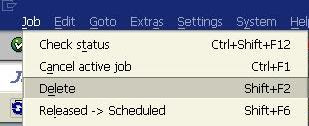
Precaution must be taken when dealing with dependent jobs. If the completion of job1 starts the job2 and if you delete job1 then job2 will not start.
When deleting the jobs the system will inform you of any such dependent jobs and you need to reschedule them to start again

Precaution must be taken when dealing with dependent jobs. If the completion of job1 starts the job2 and if you delete job1 then job2 will not start.
When deleting the jobs the system will inform you of any such dependent jobs and you need to reschedule them to start again
Maximum Number of Session Per User in SAP
What are the maximum no of sessions per user in SAP?
This is the maximum no of windows which you can open in SAP for that system.
By default the value is 6. So a user can open 6 sessions in 4.7x.
You set this values in rdisp/max_alt_modes parameter.
You can change this parameter using RZ10 in instance profile and use extended maintenance for changing this.
Mos of the companies restrict this no of sessions since they can cause unecessary load..
This is the maximum no of windows which you can open in SAP for that system.
By default the value is 6. So a user can open 6 sessions in 4.7x.
You set this values in rdisp/max_alt_modes parameter.
You can change this parameter using RZ10 in instance profile and use extended maintenance for changing this.
Mos of the companies restrict this no of sessions since they can cause unecessary load..
Friday, July 25, 2008
SAPOSCOL - SAP Operating System Collector
what is saposcol?
A)SAPOSCOL is SAP Operating System Collector
is a standalone program that runs in background at OS level. It
collects information about operatin system resource usage like
A)Only
one instance of SAPOSCOL needed to be run per hardware. Even if there
are multiple instances running on a single hardware only one SAPOSCOL
process is needed.
What is the frequency of data collection by SAPOSCOL?
A) Data is collected every ten seconds.
Where is the data collected by SAPOSCOL stored?
A)The data is stored in shared memory and for long & future usage data is stored in tables MONI & OSMON.
Tha data collected by SAPOSCOL copied to tables MONI & OSMON by background job COLLECTOR_FOR_PERFMONITOR
What are the SAP level tcodes to view this data?
A) At SAP level you can view the information collected by SAPOSCOL using tcodes/transactions ST06, OS06 & OS07.
A)SAPOSCOL is SAP Operating System Collector
is a standalone program that runs in background at OS level. It
collects information about operatin system resource usage like
- CPU Utilization
- Main Memory and Virtual Memory utilization.
- Physical Disk and File System utilization.
- Resource usage by running processes.
A)Only
one instance of SAPOSCOL needed to be run per hardware. Even if there
are multiple instances running on a single hardware only one SAPOSCOL
process is needed.
What is the frequency of data collection by SAPOSCOL?
A) Data is collected every ten seconds.
Where is the data collected by SAPOSCOL stored?
A)The data is stored in shared memory and for long & future usage data is stored in tables MONI & OSMON.
Tha data collected by SAPOSCOL copied to tables MONI & OSMON by background job COLLECTOR_FOR_PERFMONITOR
What are the SAP level tcodes to view this data?
A) At SAP level you can view the information collected by SAPOSCOL using tcodes/transactions ST06, OS06 & OS07.
What is Heap Memory?
Heap Memory stores User Context when Extended Memory allocated to a work process gets exhausted and the work process requires more space to continue. Heap Memory stores contains same type of Data as Extended Memory. Heap Memory is allocated dynamically according to requirement and not during system startup. When the workprocess starts using heap area it enters in to PRIV mode.
Important categories of Profile Parameters in SAP
These are important categories of system parameters. You can access and change them using RZ11.
to
display you can use report RSPFPAR which can be run thorough SA38. Not
all parameters can be changed.Using RZ10 (profile maintainance)
you can change parameters that are dynamically switchable and they are
activated immediately.
to
display you can use report RSPFPAR which can be run thorough SA38. Not
all parameters can be changed.Using RZ10 (profile maintainance)
you can change parameters that are dynamically switchable and they are
activated immediately.
- ES/* : Related to extended memory settings
- INSTANCE* : Identify an instance or server
- ABAP/* : Related to program execution, including heap settings
- AUTH/* : Related to authorization
- DBS/<DB Type/* : Database specific parameters
- EM/* : General system related settings
- ENQUE/* : Settings for the enqueue WP (or standalone ENQ server)
- GW/* : SAP Gateway related settings
- ICF/* & ICM/* : Settings for the Internet control framework and ICM
- LOGIN/* : Controls the logon environment (such a multiple sessions etc)
- MS/* : Message server related settings
- RDISP/* : Controls the dispatcher & dispatcher controlled processes
- STAT/* : Statistics collector related parameters
- SCSA/* : Shared common system area parameters
- ZTTA/* : Extended memory related parameters
Tcode SM50
Tcode SM50.
Sm50
tcode is used to see the workprocess overview in application
server you are logged in.
There are several fields diplayed in the work
process overview screen.
Each of the field value is described in below
table.
Menu path for this tcode is
Tools --> Administration--> Monitor -->System monitoring --> Process --> overview
Sm50
tcode is used to see the workprocess overview in application
server you are logged in.
There are several fields diplayed in the work
process overview screen.
Each of the field value is described in below
table.
Menu path for this tcode is
Tools --> Administration--> Monitor -->System monitoring --> Process --> overview
| No | This is the work process number and is unique to each work process. |
| Type | This denotes the type of work process. These are the possible values for type field DIA: Dialog UPD: Update BGD: Background ENQ: Enqueue SPO: Spool |
| PID | Process ID which is a unique no to identify the process at os level. |
| Status | This shows the status of work process like PRIV mode etc.. |
| Ended | Work process has been terminated because of some error in SAP kernel. Running – work process is busy processing user request. Waiting – work process is ready to accept user request. PRIV – Work process running with heap memory (noramally basis admins terminate the dia wp if it enters priv mode). |
| Completed | The work process has been terminated and they can not be restarted. |
| Reason | If a work process status is stopped, this field gives the reason why it is stopped. |
| Start | This field tells if the dispatcher can restart the work process if it gets terminated. |
| Err | Err field gives the no of times the work process . |
| Sem | Number of semaphore. With Green background =>Process is holding the semaphore. With Red background => Process is waiting for the semaphore. |
| CPU | The CPU Time utilization by each work process format minutes:seconds |
| Time | The time that has been consumed processing the current request (in seconds). |
| Report | The name of report which is being executed |
| Clie | Client No. |
| User | Name of user whose request is currently being executed. |
| Action | For the work process with status “running”, this displays the current action. |
| Table | The DB tables that is accessed previously by work process. |
Profile Parameters Related to Memory in SAP
Instance Profile Parameters Related to Memory
| abap/heaplimit | Work Process Restart |
| ztta/roll_extension | Limit for Extended Memory |
| ztta/roll_extension_dia | EM Quota for Dialog Work Processes |
| ztta/roll_extension_nondia | EM Quota for Non-Dialog Work Processes |
| abap/heap_area_dia | Heap Memory Limit for Dialog Work Processes |
| abap/heap_area_nondia | Heap Memory Limit for Non-Dialog Work Processes |
| abap/heap_area_total | Total Quota for Heap Memory |
| ztta/roll_area | Size of Roll Area Roll Area |
| ztta/roll_first | Size of the Initial Allocation from the Roll Area |
| abap/heap_area_total | Heap Memory Limit |
| em/initial_size_MB | Extended Memory Pool Size |
| rdisp/ROLL_SHM | Roll Buffer Size |
| rdisp/ROLL_MAXFS | Maximum Roll File Size |
| rdisp/PG_SHM | Size of the Paging Buffer |
| rdisp/PG_MAXFS | Maximum Size of SAP Paging File |
| em/blocksize_KB | Segment Size for the Extended Memory Memory Management Statistics |
| em/stat_log_size_MB | Statistics - User Context Size |
| em/stat_log_timeout | Statistics - User Context Size |
Operation modes in SAP
Using the operation modes, you can adjust the type and distribution of the
work processes to the varying load distribution during the day. You can
also adjust the distribution of the work processes to business
requirements that only occur once. During the day the demand for dialog
work process is high an system response for dialog work process must be
fast. At night there are less users so system resources are not
utilized fully if a major percent of them is reserved for dialog work
process. By defining operation modes, you can change not only the total
number of work processes defined in the profiles, but also the type and
distribution of the individual work process types within this total
number. The switch between the work process types is performed
dynamically during the runtime of the SAP system. The switch is
triggered using a defined schedule. A reserved work process is not
immediately terminated, but marked for switching. This means that
certain delays may occur. This type change is logged in the system log.
During the switch of the operation modes, neither the instance nor the
affected work processes need to be restarted. This means that the
quality of the buffer of the SAP system is retained during an operation
mode switch ,and that the request that is currently being processed by
a work process is completed. The individual work processes retain their
process ID after the switch, which can be observed in the process
overview (SM50).You can trigger an operation mode switch from a program
that you have written yourself using a function module (RZL_PERFORM_BA_SWITCH)
work processes to the varying load distribution during the day. You can
also adjust the distribution of the work processes to business
requirements that only occur once. During the day the demand for dialog
work process is high an system response for dialog work process must be
fast. At night there are less users so system resources are not
utilized fully if a major percent of them is reserved for dialog work
process. By defining operation modes, you can change not only the total
number of work processes defined in the profiles, but also the type and
distribution of the individual work process types within this total
number. The switch between the work process types is performed
dynamically during the runtime of the SAP system. The switch is
triggered using a defined schedule. A reserved work process is not
immediately terminated, but marked for switching. This means that
certain delays may occur. This type change is logged in the system log.
During the switch of the operation modes, neither the instance nor the
affected work processes need to be restarted. This means that the
quality of the buffer of the SAP system is retained during an operation
mode switch ,and that the request that is currently being processed by
a work process is completed. The individual work processes retain their
process ID after the switch, which can be observed in the process
overview (SM50).You can trigger an operation mode switch from a program
that you have written yourself using a function module (RZL_PERFORM_BA_SWITCH)
Memory allocation of non-dialog work process in UNIX & Windows
Memory allocation of non-dialog work process in UNIX
In UNIX, if Roll memory gets full Heap memory is occupied and if heap memory gets full extended memory is used.
But
in windows it is different, after roll memory (ztta/roll_first) is
filled the work process uses Extended memory, after extended memory is
fill then remainder of roll memory ( ztta/roll_area - ztta/roll_first)
is used soon..
In UNIX, if Roll memory gets full Heap memory is occupied and if heap memory gets full extended memory is used.
But
in windows it is different, after roll memory (ztta/roll_first) is
filled the work process uses Extended memory, after extended memory is
fill then remainder of roll memory ( ztta/roll_area - ztta/roll_first)
is used soon..
| Unix or Unix like systems | Windows |
| Roll Memory up to ztta/roll_area | Roll Memory up to ztta/roll_first |
| | | \|/ | | | \|/ |
| Heap Memory up to abap/heap_area_nondia or HM Exhaust | Extended Memory up to ztta/roll_extension or EM Exhaust |
| | | \|/ | | | \|/ |
| Extended Memory up to ztta/roll_extension or EM Exhaust | Roll Memory Remainder of ztta/roll_area |
| | | \|/ | |
| Heap Memory up to abap/heap_area_dia or HM Exhaust |
Some Q&A about dispatcher
What is dispatcher?
A) Dispatcher is tha central workprocess in an application server which along with operating system manages the resources for ABAP applications.
What does the dispatcher does?
A) The dispatcher distributes the transaction load among various work process, connecting to the presentation level and organizing communication. The processing requests are first saved in request queues and then processed according to 'first in -- first out' rule.
Does Dispatcher process data?
A) No, the data is processed in work process like dialog wp or background wp or update wp etc.. The dispatcher only distributes load between work process. There is no assignment of a work process to single user. The requests which are created by user using SAPGUI is distributed among the work process. Processing user requests sometimes requires data to be read from the database or written to it. For this, every work process is connected directly to the database.
A) Dispatcher is tha central workprocess in an application server which along with operating system manages the resources for ABAP applications.
What does the dispatcher does?
A) The dispatcher distributes the transaction load among various work process, connecting to the presentation level and organizing communication. The processing requests are first saved in request queues and then processed according to 'first in -- first out' rule.
Does Dispatcher process data?
A) No, the data is processed in work process like dialog wp or background wp or update wp etc.. The dispatcher only distributes load between work process. There is no assignment of a work process to single user. The requests which are created by user using SAPGUI is distributed among the work process. Processing user requests sometimes requires data to be read from the database or written to it. For this, every work process is connected directly to the database.
How do you check the status of a job
One can check the status of a background job in tcode sm37 (job overview). You can see the job status of all jobs of a userid by entering the userid in the job selection screen or you can see the status of jobs by selecting naming convention. you will have options in the sm37 screen to select jobs by their status.
What are the different status of background jobs
There are 6 status for background jobs
- Scheduled - The job has been created, but it has not yet been assigned a starting time.
- Released - The job has been created and it has been assigned a starting time.
- Ready - The job is ready to be processed.
- Active - The job is being processed.
- Finished - The job has finished successfully.
- Cancelled - The job did not finish successfully.
Memory Allocation sequence for Dialog Work Process in Windows and Unix
memory allocation for dialog work process
This is the order in
which the memory space is used. If Roll memory is filled then the
memory in Extended memory is used and soon as shown below. The memory
allocation sequence is same in windows & unix.
This is the order in
which the memory space is used. If Roll memory is filled then the
memory in Extended memory is used and soon as shown below. The memory
allocation sequence is same in windows & unix.
Roll Memory (Max size) ztta/roll_first | -------> | Extended Memory up to ztta/roll_extension or EM Exhaust | -----------+ | \|/ |
| Roll Memory Remainder of ztta/roll_area | |||
| | \|/ | |||
| Heap Memory up to abap/heap_area_dia or HM Exhaust |
| ztta/roll_first | maximum size of Roll memory |
| ztta/roll_extension | max size of extended memory |
| ztta/roll_area | max size of local roll area |
| abap/heap_area_dia | max size of heap memory |
Sunday, July 13, 2008
Why does lock table overflow occurs?
why does lock table overflow?
There are many reasons why lock table overflows.
when you try to lock a object or change a object you will see a system message
"lock table overflow", there are amny reasons this will occur.
for example
There are many reasons why lock table overflows.
when you try to lock a object or change a object you will see a system message
"lock table overflow", there are amny reasons this will occur.
for example
- small size of lock table
- a particular program sets a large no of locks
- an update process hangs hence setting a large number of locks
Sunday, July 6, 2008
What is the lock table?
The lock table is a table in the main memory of the enqueue server that records the current locks in the system. For each elementary lock, the table specifies the owner, lock mode, name, and the fields in the locked table. There is a limit to how many locks can be done in the system. The maximum number of locks in the lock table is subject to an upper limit, which can be defined in a profile parameter "enque/table_size" determines the size of the lock table in KB.
Wednesday, April 2, 2008
Few Important values to be monitored in ST02 & ST06/ST06N
In ST02,
1) Hit ratio for each buffer should be greater than 95%.
2) If hit ratio is less than 95%, no swap should be there.
3) Current usage of extended memory should not cross 75%.
4) We have to check the swaps for each buffer. For program buffers it should be 10000 hits/ day & for other buffers it should be 1000 hits/ day.
5) We have to check the free space & the free directory for each buffer.
In ST06/ST06N,
1) Ideally CPU should be free for 60% of the time.
2) Page out/s should be 0.
3) Under LAN, we have to check for collisions & errors. They should be 0.
4) We have to check for the SAPOSCOL status.
NOTE: These are very generic guidelines and may not hold appropriate for all kinds of SAP Systems. For example, on production systems, we expect better performance then other systems or Sandbox systems may experience more buffer problems. With a bit of variation, these will hold correct for most of SAP Systems.
1) Hit ratio for each buffer should be greater than 95%.
2) If hit ratio is less than 95%, no swap should be there.
3) Current usage of extended memory should not cross 75%.
4) We have to check the swaps for each buffer. For program buffers it should be 10000 hits/ day & for other buffers it should be 1000 hits/ day.
5) We have to check the free space & the free directory for each buffer.
In ST06/ST06N,
1) Ideally CPU should be free for 60% of the time.
2) Page out/s should be 0.
3) Under LAN, we have to check for collisions & errors. They should be 0.
4) We have to check for the SAPOSCOL status.
NOTE: These are very generic guidelines and may not hold appropriate for all kinds of SAP Systems. For example, on production systems, we expect better performance then other systems or Sandbox systems may experience more buffer problems. With a bit of variation, these will hold correct for most of SAP Systems.
Monday, December 31, 2007
What is the difference Between External Commands And External Programs in SAP
External commands are predefined commands for end users. They are operating-system independent and are protected by authorizations, so that normal end users can schedule only those commands that the system administrator permits them to.Like ls in unix or dir in windows. Refer to this post for information on how to run a external command
External programs are unrestricted commands that are neither pre-defined nor restricted by authorizations. A user with administrator authorization can enter any of these in a job step. For example , programs like java or other exe files
External programs are unrestricted commands that are neither pre-defined nor restricted by authorizations. A user with administrator authorization can enter any of these in a job step. For example , programs like java or other exe files
Thursday, December 27, 2007
How to view locked Users in Sap
To view locked users in sap
1) Call transaction su10
Click on authorization data and scroll down
check the locked users only field as shown in figure and execute (F8).
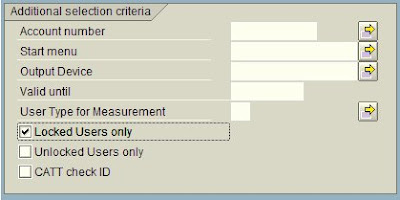
2) Call transaction sa38 and run the program RSUSR006 . You will get a list of locked users.
3) Goto transaction ewz5 you will get users with locked status
4) Run report EWULKUSR in transaction sa38 to get the list.
5) Call transaction SUIM , goto
a) authorizations > User > User by complex search criteria >List of User Master
Records Locked Due to Incorrect Logon
or
b) user > unsuccessful logons
6) Call transaction S_BCE_68001402
1) Call transaction su10
Click on authorization data and scroll down
check the locked users only field as shown in figure and execute (F8).

2) Call transaction sa38 and run the program RSUSR006 . You will get a list of locked users.
3) Goto transaction ewz5 you will get users with locked status
4) Run report EWULKUSR in transaction sa38 to get the list.
5) Call transaction SUIM , goto
a) authorizations > User > User by complex search criteria >List of User Master
Records Locked Due to Incorrect Logon
or
b) user > unsuccessful logons
6) Call transaction S_BCE_68001402
Subscribe to:
Posts (Atom)
Showing posts with label Basis. Show all posts
Showing posts with label Basis. Show all posts
Sunday, January 11, 2009
How to know or get the Kernel Version of SAP system
There are many ways through which you can get the Version Number of SAP Kernel.
One of the method is from any window in the top menu go to
system--> status and click on the other kernel info button which is between the navigate and cancel buttons.
Another method is to login as administrator and enter the following disp+work -v. in command field on left top corner. This will show you the kernel version of SAP.
You can also check the log or trace files at os level /usr/sap/work/dev_disp.
You can also get this kernel information from sm51 screen. Go to transaction sm51 then click on database server (single click only. Not double click) and then click on release notes. Then you will see the kernel information and patch level.
If you guys are interested checkout out our new php tutorials website
Php Tutorials
One of the method is from any window in the top menu go to
system--> status and click on the other kernel info button which is between the navigate and cancel buttons.
Another method is to login as administrator and enter the following disp+work -v. in command field on left top corner. This will show you the kernel version of SAP.
You can also check the log or trace files at os level /usr/sap/work/dev_disp.
You can also get this kernel information from sm51 screen. Go to transaction sm51 then click on database server (single click only. Not double click) and then click on release notes. Then you will see the kernel information and patch level.
If you guys are interested checkout out our new php tutorials website
Php Tutorials
How to restrict Multiple Logins of Users in SAP
This is a critical and security feature. You can know whether some one is logon using your user id from any other computer. Multiple logons of users must be set to 1 in sap production systems. This can be allowed in DEV systems. But in production it must be restricted.
Go to rz10 and change the paramenter
login/multi_login_users. By default the value is 0 which is inactive. If you want to activate mupltiple logons for some users in sap like service users you have to change the parameter
login/disable_multi_gui_login = you have to enter the user names in the values seperated by semi colon ; and dont leave spaces between the userids. Now you have to restart the instance.
Go to rz10 and change the paramenter
login/multi_login_users. By default the value is 0 which is inactive. If you want to activate mupltiple logons for some users in sap like service users you have to change the parameter
login/disable_multi_gui_login = you have to enter the user names in the values seperated by semi colon ; and dont leave spaces between the userids. Now you have to restart the instance.
How to Delete a Scheduled Background Job in SAP
To deleted scheduled jobs in SAP you need to go to Tcode SM37. Now you select the jobs that you want to delete. Click on the check button left side of each job name and now in the menu go to job->delete.
Precaution must be taken when dealing with dependent jobs. If the completion of job1 starts the job2 and if you delete job1 then job2 will not start.
When deleting the jobs the system will inform you of any such dependent jobs and you need to reschedule them to start again
Precaution must be taken when dealing with dependent jobs. If the completion of job1 starts the job2 and if you delete job1 then job2 will not start.
When deleting the jobs the system will inform you of any such dependent jobs and you need to reschedule them to start again
Maximum Number of Session Per User in SAP
What are the maximum no of sessions per user in SAP?
This is the maximum no of windows which you can open in SAP for that system.
By default the value is 6. So a user can open 6 sessions in 4.7x.
You set this values in rdisp/max_alt_modes parameter.
You can change this parameter using RZ10 in instance profile and use extended maintenance for changing this.
Mos of the companies restrict this no of sessions since they can cause unecessary load..
This is the maximum no of windows which you can open in SAP for that system.
By default the value is 6. So a user can open 6 sessions in 4.7x.
You set this values in rdisp/max_alt_modes parameter.
You can change this parameter using RZ10 in instance profile and use extended maintenance for changing this.
Mos of the companies restrict this no of sessions since they can cause unecessary load..
Friday, July 25, 2008
SAPOSCOL - SAP Operating System Collector
what is saposcol?
A)SAPOSCOL is SAP Operating System Collector
is a standalone program that runs in background at OS level. It
collects information about operatin system resource usage like
A)Only
one instance of SAPOSCOL needed to be run per hardware. Even if there
are multiple instances running on a single hardware only one SAPOSCOL
process is needed.
What is the frequency of data collection by SAPOSCOL?
A) Data is collected every ten seconds.
Where is the data collected by SAPOSCOL stored?
A)The data is stored in shared memory and for long & future usage data is stored in tables MONI & OSMON.
Tha data collected by SAPOSCOL copied to tables MONI & OSMON by background job COLLECTOR_FOR_PERFMONITOR
What are the SAP level tcodes to view this data?
A) At SAP level you can view the information collected by SAPOSCOL using tcodes/transactions ST06, OS06 & OS07.
A)SAPOSCOL is SAP Operating System Collector
is a standalone program that runs in background at OS level. It
collects information about operatin system resource usage like
- CPU Utilization
- Main Memory and Virtual Memory utilization.
- Physical Disk and File System utilization.
- Resource usage by running processes.
A)Only
one instance of SAPOSCOL needed to be run per hardware. Even if there
are multiple instances running on a single hardware only one SAPOSCOL
process is needed.
What is the frequency of data collection by SAPOSCOL?
A) Data is collected every ten seconds.
Where is the data collected by SAPOSCOL stored?
A)The data is stored in shared memory and for long & future usage data is stored in tables MONI & OSMON.
Tha data collected by SAPOSCOL copied to tables MONI & OSMON by background job COLLECTOR_FOR_PERFMONITOR
What are the SAP level tcodes to view this data?
A) At SAP level you can view the information collected by SAPOSCOL using tcodes/transactions ST06, OS06 & OS07.
What is Heap Memory?
Heap Memory stores User Context when Extended Memory allocated to a work process gets exhausted and the work process requires more space to continue. Heap Memory stores contains same type of Data as Extended Memory. Heap Memory is allocated dynamically according to requirement and not during system startup. When the workprocess starts using heap area it enters in to PRIV mode.
Important categories of Profile Parameters in SAP
These are important categories of system parameters. You can access and change them using RZ11.
to
display you can use report RSPFPAR which can be run thorough SA38. Not
all parameters can be changed.Using RZ10 (profile maintainance)
you can change parameters that are dynamically switchable and they are
activated immediately.
to
display you can use report RSPFPAR which can be run thorough SA38. Not
all parameters can be changed.Using RZ10 (profile maintainance)
you can change parameters that are dynamically switchable and they are
activated immediately.
- ES/* : Related to extended memory settings
- INSTANCE* : Identify an instance or server
- ABAP/* : Related to program execution, including heap settings
- AUTH/* : Related to authorization
- DBS/<DB Type/* : Database specific parameters
- EM/* : General system related settings
- ENQUE/* : Settings for the enqueue WP (or standalone ENQ server)
- GW/* : SAP Gateway related settings
- ICF/* & ICM/* : Settings for the Internet control framework and ICM
- LOGIN/* : Controls the logon environment (such a multiple sessions etc)
- MS/* : Message server related settings
- RDISP/* : Controls the dispatcher & dispatcher controlled processes
- STAT/* : Statistics collector related parameters
- SCSA/* : Shared common system area parameters
- ZTTA/* : Extended memory related parameters
Tcode SM50
Tcode SM50.
Sm50
tcode is used to see the workprocess overview in application
server you are logged in.
There are several fields diplayed in the work
process overview screen.
Each of the field value is described in below
table.
Menu path for this tcode is
Tools --> Administration--> Monitor -->System monitoring --> Process --> overview
Sm50
tcode is used to see the workprocess overview in application
server you are logged in.
There are several fields diplayed in the work
process overview screen.
Each of the field value is described in below
table.
Menu path for this tcode is
Tools --> Administration--> Monitor -->System monitoring --> Process --> overview
| No | This is the work process number and is unique to each work process. |
| Type | This denotes the type of work process. These are the possible values for type field DIA: Dialog UPD: Update BGD: Background ENQ: Enqueue SPO: Spool |
| PID | Process ID which is a unique no to identify the process at os level. |
| Status | This shows the status of work process like PRIV mode etc.. |
| Ended | Work process has been terminated because of some error in SAP kernel. Running – work process is busy processing user request. Waiting – work process is ready to accept user request. PRIV – Work process running with heap memory (noramally basis admins terminate the dia wp if it enters priv mode). |
| Completed | The work process has been terminated and they can not be restarted. |
| Reason | If a work process status is stopped, this field gives the reason why it is stopped. |
| Start | This field tells if the dispatcher can restart the work process if it gets terminated. |
| Err | Err field gives the no of times the work process . |
| Sem | Number of semaphore. With Green background =>Process is holding the semaphore. With Red background => Process is waiting for the semaphore. |
| CPU | The CPU Time utilization by each work process format minutes:seconds |
| Time | The time that has been consumed processing the current request (in seconds). |
| Report | The name of report which is being executed |
| Clie | Client No. |
| User | Name of user whose request is currently being executed. |
| Action | For the work process with status “running”, this displays the current action. |
| Table | The DB tables that is accessed previously by work process. |
Profile Parameters Related to Memory in SAP
Instance Profile Parameters Related to Memory
| abap/heaplimit | Work Process Restart |
| ztta/roll_extension | Limit for Extended Memory |
| ztta/roll_extension_dia | EM Quota for Dialog Work Processes |
| ztta/roll_extension_nondia | EM Quota for Non-Dialog Work Processes |
| abap/heap_area_dia | Heap Memory Limit for Dialog Work Processes |
| abap/heap_area_nondia | Heap Memory Limit for Non-Dialog Work Processes |
| abap/heap_area_total | Total Quota for Heap Memory |
| ztta/roll_area | Size of Roll Area Roll Area |
| ztta/roll_first | Size of the Initial Allocation from the Roll Area |
| abap/heap_area_total | Heap Memory Limit |
| em/initial_size_MB | Extended Memory Pool Size |
| rdisp/ROLL_SHM | Roll Buffer Size |
| rdisp/ROLL_MAXFS | Maximum Roll File Size |
| rdisp/PG_SHM | Size of the Paging Buffer |
| rdisp/PG_MAXFS | Maximum Size of SAP Paging File |
| em/blocksize_KB | Segment Size for the Extended Memory Memory Management Statistics |
| em/stat_log_size_MB | Statistics - User Context Size |
| em/stat_log_timeout | Statistics - User Context Size |
Operation modes in SAP
Using the operation modes, you can adjust the type and distribution of the
work processes to the varying load distribution during the day. You can
also adjust the distribution of the work processes to business
requirements that only occur once. During the day the demand for dialog
work process is high an system response for dialog work process must be
fast. At night there are less users so system resources are not
utilized fully if a major percent of them is reserved for dialog work
process. By defining operation modes, you can change not only the total
number of work processes defined in the profiles, but also the type and
distribution of the individual work process types within this total
number. The switch between the work process types is performed
dynamically during the runtime of the SAP system. The switch is
triggered using a defined schedule. A reserved work process is not
immediately terminated, but marked for switching. This means that
certain delays may occur. This type change is logged in the system log.
During the switch of the operation modes, neither the instance nor the
affected work processes need to be restarted. This means that the
quality of the buffer of the SAP system is retained during an operation
mode switch ,and that the request that is currently being processed by
a work process is completed. The individual work processes retain their
process ID after the switch, which can be observed in the process
overview (SM50).You can trigger an operation mode switch from a program
that you have written yourself using a function module (RZL_PERFORM_BA_SWITCH)
work processes to the varying load distribution during the day. You can
also adjust the distribution of the work processes to business
requirements that only occur once. During the day the demand for dialog
work process is high an system response for dialog work process must be
fast. At night there are less users so system resources are not
utilized fully if a major percent of them is reserved for dialog work
process. By defining operation modes, you can change not only the total
number of work processes defined in the profiles, but also the type and
distribution of the individual work process types within this total
number. The switch between the work process types is performed
dynamically during the runtime of the SAP system. The switch is
triggered using a defined schedule. A reserved work process is not
immediately terminated, but marked for switching. This means that
certain delays may occur. This type change is logged in the system log.
During the switch of the operation modes, neither the instance nor the
affected work processes need to be restarted. This means that the
quality of the buffer of the SAP system is retained during an operation
mode switch ,and that the request that is currently being processed by
a work process is completed. The individual work processes retain their
process ID after the switch, which can be observed in the process
overview (SM50).You can trigger an operation mode switch from a program
that you have written yourself using a function module (RZL_PERFORM_BA_SWITCH)
Memory allocation of non-dialog work process in UNIX & Windows
Memory allocation of non-dialog work process in UNIX
In UNIX, if Roll memory gets full Heap memory is occupied and if heap memory gets full extended memory is used.
But
in windows it is different, after roll memory (ztta/roll_first) is
filled the work process uses Extended memory, after extended memory is
fill then remainder of roll memory ( ztta/roll_area - ztta/roll_first)
is used soon..
In UNIX, if Roll memory gets full Heap memory is occupied and if heap memory gets full extended memory is used.
But
in windows it is different, after roll memory (ztta/roll_first) is
filled the work process uses Extended memory, after extended memory is
fill then remainder of roll memory ( ztta/roll_area - ztta/roll_first)
is used soon..
| Unix or Unix like systems | Windows |
| Roll Memory up to ztta/roll_area | Roll Memory up to ztta/roll_first |
| | | \|/ | | | \|/ |
| Heap Memory up to abap/heap_area_nondia or HM Exhaust | Extended Memory up to ztta/roll_extension or EM Exhaust |
| | | \|/ | | | \|/ |
| Extended Memory up to ztta/roll_extension or EM Exhaust | Roll Memory Remainder of ztta/roll_area |
| | | \|/ | |
| Heap Memory up to abap/heap_area_dia or HM Exhaust |
Some Q&A about dispatcher
What is dispatcher?
A) Dispatcher is tha central workprocess in an application server which along with operating system manages the resources for ABAP applications.
What does the dispatcher does?
A) The dispatcher distributes the transaction load among various work process, connecting to the presentation level and organizing communication. The processing requests are first saved in request queues and then processed according to 'first in -- first out' rule.
Does Dispatcher process data?
A) No, the data is processed in work process like dialog wp or background wp or update wp etc.. The dispatcher only distributes load between work process. There is no assignment of a work process to single user. The requests which are created by user using SAPGUI is distributed among the work process. Processing user requests sometimes requires data to be read from the database or written to it. For this, every work process is connected directly to the database.
A) Dispatcher is tha central workprocess in an application server which along with operating system manages the resources for ABAP applications.
What does the dispatcher does?
A) The dispatcher distributes the transaction load among various work process, connecting to the presentation level and organizing communication. The processing requests are first saved in request queues and then processed according to 'first in -- first out' rule.
Does Dispatcher process data?
A) No, the data is processed in work process like dialog wp or background wp or update wp etc.. The dispatcher only distributes load between work process. There is no assignment of a work process to single user. The requests which are created by user using SAPGUI is distributed among the work process. Processing user requests sometimes requires data to be read from the database or written to it. For this, every work process is connected directly to the database.
How do you check the status of a job
One can check the status of a background job in tcode sm37 (job overview). You can see the job status of all jobs of a userid by entering the userid in the job selection screen or you can see the status of jobs by selecting naming convention. you will have options in the sm37 screen to select jobs by their status.
What are the different status of background jobs
There are 6 status for background jobs
- Scheduled - The job has been created, but it has not yet been assigned a starting time.
- Released - The job has been created and it has been assigned a starting time.
- Ready - The job is ready to be processed.
- Active - The job is being processed.
- Finished - The job has finished successfully.
- Cancelled - The job did not finish successfully.
Memory Allocation sequence for Dialog Work Process in Windows and Unix
memory allocation for dialog work process
This is the order in
which the memory space is used. If Roll memory is filled then the
memory in Extended memory is used and soon as shown below. The memory
allocation sequence is same in windows & unix.
This is the order in
which the memory space is used. If Roll memory is filled then the
memory in Extended memory is used and soon as shown below. The memory
allocation sequence is same in windows & unix.
Roll Memory (Max size) ztta/roll_first | -------> | Extended Memory up to ztta/roll_extension or EM Exhaust | -----------+ | \|/ |
| Roll Memory Remainder of ztta/roll_area | |||
| | \|/ | |||
| Heap Memory up to abap/heap_area_dia or HM Exhaust |
| ztta/roll_first | maximum size of Roll memory |
| ztta/roll_extension | max size of extended memory |
| ztta/roll_area | max size of local roll area |
| abap/heap_area_dia | max size of heap memory |
Sunday, July 13, 2008
Why does lock table overflow occurs?
why does lock table overflow?
There are many reasons why lock table overflows.
when you try to lock a object or change a object you will see a system message
"lock table overflow", there are amny reasons this will occur.
for example
There are many reasons why lock table overflows.
when you try to lock a object or change a object you will see a system message
"lock table overflow", there are amny reasons this will occur.
for example
- small size of lock table
- a particular program sets a large no of locks
- an update process hangs hence setting a large number of locks
Sunday, July 6, 2008
What is the lock table?
The lock table is a table in the main memory of the enqueue server that records the current locks in the system. For each elementary lock, the table specifies the owner, lock mode, name, and the fields in the locked table. There is a limit to how many locks can be done in the system. The maximum number of locks in the lock table is subject to an upper limit, which can be defined in a profile parameter "enque/table_size" determines the size of the lock table in KB.
Wednesday, April 2, 2008
Few Important values to be monitored in ST02 & ST06/ST06N
In ST02,
1) Hit ratio for each buffer should be greater than 95%.
2) If hit ratio is less than 95%, no swap should be there.
3) Current usage of extended memory should not cross 75%.
4) We have to check the swaps for each buffer. For program buffers it should be 10000 hits/ day & for other buffers it should be 1000 hits/ day.
5) We have to check the free space & the free directory for each buffer.
In ST06/ST06N,
1) Ideally CPU should be free for 60% of the time.
2) Page out/s should be 0.
3) Under LAN, we have to check for collisions & errors. They should be 0.
4) We have to check for the SAPOSCOL status.
NOTE: These are very generic guidelines and may not hold appropriate for all kinds of SAP Systems. For example, on production systems, we expect better performance then other systems or Sandbox systems may experience more buffer problems. With a bit of variation, these will hold correct for most of SAP Systems.
1) Hit ratio for each buffer should be greater than 95%.
2) If hit ratio is less than 95%, no swap should be there.
3) Current usage of extended memory should not cross 75%.
4) We have to check the swaps for each buffer. For program buffers it should be 10000 hits/ day & for other buffers it should be 1000 hits/ day.
5) We have to check the free space & the free directory for each buffer.
In ST06/ST06N,
1) Ideally CPU should be free for 60% of the time.
2) Page out/s should be 0.
3) Under LAN, we have to check for collisions & errors. They should be 0.
4) We have to check for the SAPOSCOL status.
NOTE: These are very generic guidelines and may not hold appropriate for all kinds of SAP Systems. For example, on production systems, we expect better performance then other systems or Sandbox systems may experience more buffer problems. With a bit of variation, these will hold correct for most of SAP Systems.
Monday, December 31, 2007
What is the difference Between External Commands And External Programs in SAP
External commands are predefined commands for end users. They are operating-system independent and are protected by authorizations, so that normal end users can schedule only those commands that the system administrator permits them to.Like ls in unix or dir in windows. Refer to this post for information on how to run a external command
External programs are unrestricted commands that are neither pre-defined nor restricted by authorizations. A user with administrator authorization can enter any of these in a job step. For example , programs like java or other exe files
External programs are unrestricted commands that are neither pre-defined nor restricted by authorizations. A user with administrator authorization can enter any of these in a job step. For example , programs like java or other exe files
Thursday, December 27, 2007
How to view locked Users in Sap
To view locked users in sap
1) Call transaction su10
Click on authorization data and scroll down
check the locked users only field as shown in figure and execute (F8).
2) Call transaction sa38 and run the program RSUSR006 . You will get a list of locked users.
3) Goto transaction ewz5 you will get users with locked status
4) Run report EWULKUSR in transaction sa38 to get the list.
5) Call transaction SUIM , goto
a) authorizations > User > User by complex search criteria >List of User Master
Records Locked Due to Incorrect Logon
or
b) user > unsuccessful logons
6) Call transaction S_BCE_68001402
1) Call transaction su10
Click on authorization data and scroll down
check the locked users only field as shown in figure and execute (F8).
2) Call transaction sa38 and run the program RSUSR006 . You will get a list of locked users.
3) Goto transaction ewz5 you will get users with locked status
4) Run report EWULKUSR in transaction sa38 to get the list.
5) Call transaction SUIM , goto
a) authorizations > User > User by complex search criteria >List of User Master
Records Locked Due to Incorrect Logon
or
b) user > unsuccessful logons
6) Call transaction S_BCE_68001402
Subscribe to:
Posts (Atom)